
Webhooks
Post messages and cards into a Gryt channel with one HTTP request, and try a card before you send it.
A webhook is a URL that posts into one channel. Anything that can send an HTTP request can use it: a CI job, a cron script, a monitoring tool. There's no SDK, no login and no socket to keep open. You POST some JSON and a message shows up.
A webhook can only post. It can't read the channel, reply to anyone or react to messages. If you need any of that, write a bot instead.
Make one
You need the Manage webhooks permission on the server.
- Open the server menu (the three dots next to the server name) and pick Server settings
- Go to Webhooks and press Create webhook
- Give it a name, pick the channel it posts to, and click the avatar to give it a picture
- Use the copy button to copy its URL
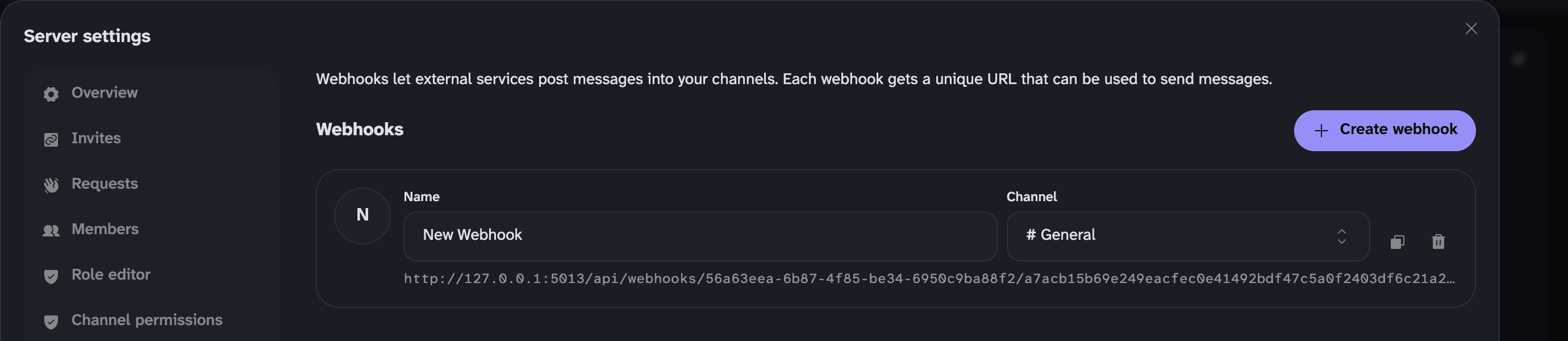
Name, channel and picture save as you change them. The trash button deletes the webhook, and its URL stops working straight away.
The URL
https://<your server>/api/webhooks/<webhook id>/<token>The token is the whole of the security. Anyone who has the URL can post as the webhook, so keep it out of public repositories and logs. There's no way to rotate a token. If a URL leaks, delete the webhook and make a new one.
Send a message
curl -X POST 'https://gryt.example.com/api/webhooks/WEBHOOK_ID/TOKEN' \
  -H 'Content-Type: application/json' \
  -d '{"text": "Hello from curl"}'
That's a whole message. text takes the same markdown as the chat box.
Add cards for something with a title, colour, fields and pictures:
curl -X POST 'https://gryt.example.com/api/webhooks/WEBHOOK_ID/TOKEN' \
  -H 'Content-Type: application/json' \
  -d '{
    "display_name": "Backups",
    "cards": [{
      "title": "Backup finished",
      "description": "All 3 volumes copied in 2m 41s.",
      "color": "#3fb27f"
    }]
  }'
The server answers once the message is posted:
{
  "message_id": "7999e063-ccdb-46d3-8cd3-b1decc35dfd6",
  "conversation_id": "general",
  "warnings": []
}
Try a card
Edit the JSON and the card on the right redraws. It's drawn with the same
WebhookCard component from @gryt/ui that the app uses,
and the checks under the editor follow the server's rules, so a payload that
passes here passes there. Copy as curl gives you a command with a
placeholder URL to swap for yours.
Two things differ from the app. The preview loads pictures straight from the URLs you type, from your own browser. Gryt doesn't: the server downloads them once when the message is posted (see Pictures). And the preview only does bold, italics, strikethrough, inline code and links. The app's markdown also does code blocks, lists, emoji and mentions.
Payload
This reference is read from the server's own OpenAPI document,
openapi/webhooks.json,
which is generated from the schema the route checks payloads with. A check in
CI fails when this page and that file disagree.
Message
Prop
Type
A message needs text, at least one card, or both. display_name and
avatar_url only change this one message. The webhook's own name and picture
stay as they are.
Card
Prop
Type
A card needs at least one of title, description, fields, image_url or
author. The title, description, author name, footer text and every field's
name and value count towards a limit of 6000 characters, added up across all
the cards in the message.
Timestamps show in each reader's own time zone.
Author
Prop
Type
Field
Prop
Type
Inline fields sit side by side as long as there's room. A field that isn't inline gets a row to itself.
Footer
Prop
Type
Pictures
avatar_url, image_url, thumbnail_url and both icon_urls are downloaded
by the Gryt server when the message is posted. It stores a copy and the message
points at that copy. People reading the channel load the picture from your Gryt
server and never contact the host it came from, so that host can't see who
read the message or when.
That also means the picture is fixed at post time. Changing the file at the original URL afterwards changes nothing in Gryt.
- PNG, JPEG, WebP and GIF. SVG is refused. The server checks the file's bytes,
not its name or
Content-Type - Up to 8 MB for
image_urlandthumbnail_url, 1 MB foravatar_urland the icons, and 32 MB for all the pictures in one message - 12 seconds to download all of them
- Private and local addresses are refused, and so is a chain of more than 5 redirects
- The same URL used twice in a message is downloaded once
avatar_urlis resized to 256 px, the same as any other avatar. Card pictures keep their size
A picture that fails doesn't stop the message. It posts without that picture,
and the reply lists what went wrong under warnings. Because of the downloads,
a message with pictures can take a few seconds to answer.
Mentions
Only text can notify anyone. A mention is a markdown link to mention: and
the member's ID:
{ "text": "Deploy failed, [@Sivert](mention:user_166ad0aa-aef6-494d-8475-9c842fbc29b2) can you look?" }To get an ID, right-click the member in the member list and pick Copy ID.
Mentions inside cards draw like mentions but never notify, so a card listing ten commit authors doesn't ping all ten.
Older clients
A client that can't draw cards shows a single line instead. When a message has
cards and no text, the server writes that line itself: the first card's
title, or its author's name if it has no title, plus a count like "(+2 more)"
when there are more cards. When the first card has neither, it says "Posted a
card", or "Posted 3 cards".
Mentions and links are broken on purpose in that line, so it can't ping anyone
or unfurl. Clients that do draw cards hide it. If you send text as well,
older clients show your text and nothing else.
When it goes wrong
A refused payload posts nothing. Every problem comes back at once, up to 20,
each with a path into your JSON:
{
  "error": "invalid_payload",
  "message": "The payload has 3 problems.",
  "problems": [
    { "path": "cards[0].color", "code": "invalid_color", "message": "Use #rrggbb or an integer from 0 to 16777215." },
    { "path": "cards[0].timestamp", "code": "invalid_timestamp", "message": "Invalid ISO datetime" },
    { "path": "cards[0]", "code": "empty_card", "message": "A card needs a title, description, fields, image_url or author." }
  ]
}
limit is there too when the problem is a limit. Match on code, since
message is for people and can change.
| Code | Meaning |
|---|---|
required | Missing, or empty once spaces are trimmed off. |
wrong_type | The wrong kind of value, like a number where text belongs. |
too_long | Over the character limit in limit. |
too_many | More cards or fields than limit allows. |
invalid_url | Not an http or https URL. |
invalid_color | Not #rrggbb, and not a whole number from 0 to 16777215. |
invalid_timestamp | Not ISO 8601 with a time zone. 2026-09-15T07:42:00Z works, 2026-09-15 doesn't. |
empty_card | The card has no title, description, fields, image_url or author. |
total_too_long | All the cards' text together is over 6000 characters. |
invalid_format | A string in a shape the server doesn't accept. |
invalid | Anything else the server refused. |
Some answers have no problems list. The first two are from before cards
existed, and they come back instead of invalid_payload when they're the only
problem:
| Status | Body | When |
|---|---|---|
| 400 | {"error": "empty_message"} | No text (or only spaces) and no cards |
| 400 | {"error": "message_too_long"} | text is over 4,000 characters |
| 400 | {"error": "no_channel"} | The webhook has no channel set |
| 400 | {"error": "invalid_json"} | The body isn't valid JSON |
| 404 | {"error": "not_found"} | No webhook with that ID and token |
| 413 | {"error": "body_too_large"} | The body is over 256 KB |
| 429 | {"error": "rate_limited", "retry_after_ms": 59988} | See Rate limits |
Older servers answer bad JSON with a 500 and "error": "internal_error"
instead, and let bodies up to 2 MB through before doing the same. If you have to
handle those, treat a 5xx as "check the request, then try again later".
Warnings
A message that posts can still come back with warnings:
{
  "message_id": "7999e063-ccdb-46d3-8cd3-b1decc35dfd6",
  "conversation_id": "general",
  "warnings": [
    { "path": "embeds", "code": "unknown_key", "message": "embeds isn't part of a webhook message and was ignored." },
    { "path": "cards[0].image_url", "code": "blocked", "message": "That address isn't allowed, so the picture was left out." }
  ]
}
Keys Gryt doesn't know are ignored rather than refused, so a payload written for
another chat app mostly works. Log warnings from anything automated, or a
missing picture goes unnoticed.
| Code | Meaning |
|---|---|
unknown_key | A key Gryt doesn't know. It was ignored and the rest posted. |
blocked | The picture's address is private or local, or it redirected more than 5 times. |
fetch_failed | The picture's host answered with an error, or couldn't be reached. |
too_large | Over 8 MB for an image or thumbnail, or over 1 MB for an icon or avatar. |
timeout | The pictures weren't all downloaded within 12 seconds. |
unsupported_type | Not a PNG, JPEG, WebP or GIF. SVG is refused. The server looks at the bytes, not the file name. |
invalid_image | The file claimed to be an image but couldn't be decoded. |
media_budget | The message's pictures went over 32 MB together. |
store_failed | The server couldn't save the picture. |
Rate limits
Each webhook gets a burst of 15 requests, then about one every 2 seconds, or 30
a minute. Go over and that webhook gets 429 for 60 seconds, with
retry_after_ms saying how long is left.
It counts every request to the webhook's URL, including refused payloads, and it's per webhook rather than per caller, so two scripts sharing a URL share the limit. Bad JSON and bodies over 256 KB are turned away before they're counted. The counter lives in the server's memory and resets when it restarts. Rate limiting has the server's other limits.
Recipes
Deploy notice from GitHub Actions
Save the webhook URL as a repository secret called GRYT_WEBHOOK_URL, then add
a step at the end of the deploy job:
- name: Tell Gryt
  if: always()
  env:
    GRYT_WEBHOOK_URL: ${{ secrets.GRYT_WEBHOOK_URL }}
    STATUS: ${{ job.status }}
  run: |
    if [ "$STATUS" = "success" ]; then color="#3fb27f"; else color="#e5484d"; fi
    jq -n \
      --arg status "$STATUS" --arg color "$color" \
      --arg repo "$GITHUB_REPOSITORY" --arg sha "${GITHUB_SHA::7}" \
      --arg actor "$GITHUB_ACTOR" \
      --arg url "$GITHUB_SERVER_URL/$GITHUB_REPOSITORY/actions/runs/$GITHUB_RUN_ID" \
      '{
        display_name: "Deploys",
        cards: [{
          title: "Deploy \($status): \($repo)",
          url: $url,
          color: $color,
          fields: [
            { name: "Commit", value: $sha, inline: true },
            { name: "By", value: $actor, inline: true }
          ],
          timestamp: (now | todate)
        }]
      }' |
    curl -fsS -X POST "$GRYT_WEBHOOK_URL" \
      -H 'Content-Type: application/json' --data-binary @-
jq is already on GitHub's runners. It builds the JSON for you, so a quote in
a name can't break the payload.
Uptime alert from cron
A script that checks a URL and posts only when the answer changes, so a site that's down all night sends two messages instead of 500:
#!/bin/sh
# Run from cron every minute: * * * * * /usr/local/bin/check-api.sh
WEBHOOK_URL="https://gryt.example.com/api/webhooks/WEBHOOK_ID/TOKEN"
TARGET="https://api.example.com/health"
STATE=/var/tmp/check-api.state

code=$(curl -s -o /dev/null -m 10 -w '%{http_code}' "$TARGET")
[ "$code" = "200" ] && now=up || now=down
[ "$(cat "$STATE" 2>/dev/null)" = "$now" ] && exit 0
echo "$now" > "$STATE"

if [ "$now" = "down" ]; then
  title="$TARGET is down"; color="#e5484d"
else
  title="$TARGET is back"; color="#3fb27f"
fi

jq -n --arg title "$title" --arg color "$color" --arg code "$code" '{
  display_name: "Uptime",
  cards: [{
    title: $title,
    color: $color,
    fields: [{ name: "Status", value: $code, inline: true }],
    timestamp: (now | todate)
  }]
}' | curl -fsS -X POST "$WEBHOOK_URL" -H 'Content-Type: application/json' --data-binary @-
Plain text from any script
No jq, no cards. Fine for a quick "it's done":
curl -fsS -X POST "$WEBHOOK_URL" \
  -H 'Content-Type: application/json' \
  -d "{\"text\": \"Backup on $(hostname) finished at $(date -u +%H:%M) UTC\"}"
Keep anything you didn't write yourself out of a string like that. A file name
with a quote in it breaks the JSON. Use jq -n --arg like the recipes above
when the text comes from somewhere else.
Managing webhooks over the API
The Webhooks tab uses these, and so can you, with a member's access token that
has Manage webhooks. They're listed in Server API,
and the request and response shapes are in the same
openapi/webhooks.json.